New Plugin for Telycam PTZ Cameras for Popular Control Platform

Streamline Corporate AV by Integrating Telycam with Popular Control Platform.
 Unlock the full potential of your Telycam Explore, Explore SE, Vision+, and Drive+ series cameras with the newly developed popular control platform plugin.
Drive-4KN Telycam

Designed specifically for corporate environments, this powerful plugin allows you to easily integrate and control your Telycam cameras through the popular control platform, streamlining video production and conferencing with unmatched precision and ease.

Key Features of the Telycam Popular Control Platform Plugin:

1. Comprehensive Camera Control:

Utilizes VISCA over IP for full PTZ control, allowing adjustments to pan, tilt, zoom, and focus with speed settings.

2. Auto-Tracking Customisation:

Enable or disable auto-tracking directly from the control interface, allowing you to adjust tracking target scaling, position, switching, pan and tilt limits, and board area, including tilt lock and scaling ratio lock.

3. Custom Preset Management:

Access up to 64 presets quickly and navigate easily through your recently used options.

4. Picture Settings:

Quick access to picture settings, including white balance, exposure, and Genlock.

5. Video and Audio Control:

The ‘Video Encode’ section provides settings for encoding mode, resolution, bit rate, etc. The ‘Audio’ section includes options for enabling/disabling audio, mic/line selection, phantom power, and volume adjustments.

Feel free to email or call us to purchase this product

Deliver End-to-End Secure Optical Videowall Systems with Quantum Ultra II FOX3 Cards

Integrating a Quantum Ultra II videowall processor within a secure FOX3 distribution architecture just got easier with the Quantum IN4FOX3 Series and Quantum OUT4FOX3 Series of input and output cards. Each card offers four channels of connectivity.

unnamed

They incorporate our exclusive technology to distribute pixel-perfect, uncompressed video up to 4K/60 @ 4:4:4 over two fibers or mathematically lossless 4K/60 @ 4:4:4 over one fiber. Embedded audio can be routed from any input to each active canvas. Ethernet to RS-232 insertion enables control data to be transmitted alongside the video when a bidirectional fiber configuration is employed. Four Quantum IN4FOX3 models and four Quantum OUT4FOX3 models are available, providing full compatibility with the entire FOX3 product family.

1

Key Features

  • Streamlines videowall integration with fiber distribution systems
  • Compatible with FOX3 matrix switchers and endpoints
  • Supports four 4K/60 signals per card
  • Embedded audio switching
  • Ethernet to RS‑232 insertion for AV device control
  • Supports uncompressed and mathematically lossless signal formats

learn more
The Quantum IN4FOX3 and Quantum OUT4FOX3 will be available February 2024.

Pro 4K USB-C Dock with Video, 10G Data, and Power Now Shipping

ADKq_NY8FIjirMXdY0TKl6xDzwQnaHZb
now shipping

We are pleased to announce that the UCS 601 is now shipping. In the evolving landscape of collaboration spaces, the integration of USB peripherals, including cameras and microphones, has become indispensable for effective meetings. The UCS 601 stands out as a Pro 4K USB-C dock designed with integrator-friendly features for professional applications, adeptly connecting USB-C laptops to HDMI displays, supporting up to three USB devices, and ensuring high data rates of up to USB 10 Gbps.

UCS 601

The HDMI output is engineered to support resolutions up to 4K, while the USB-C input efficiently handles video/audio, USB data, and even charges the user’s laptop with its integrated 60-watt power supply. Perfectly tailored for platforms such as Teams®, Zoom™, and other UC applications, the UCS 601 4K USB-C Dock is the optimal Pro AV docking solution for environments that require minimal AV hardware yet desire maximum functionality.

diagram

Key Features

  • Connects USB‑C® laptops to AV and USB peripheral devices
  • Single connection for video, USB data, and power for USB-C source devices
  • Supports computer and video resolutions up to 4K/60 @ 4:4:4
  • Provides USB device connections up to USB 10 Gbps
  • Provides up to 60 watts of power to the USB-C source
  • Patented ZipClip® 200 mounting kit included


learn more

Effortless Video Conferencing with Meet+ 200: a high-level 4K Ultra HD USB2.0 webcam

In today’s fast-paced world, video conferencing has become an essential part of our professional lives. Whether you’re working from home, collaborating with a remote team, or connecting with clients, the quality of your video conferencing equipment can make a significant difference. That’s where Meet+ 200 comes into play, offering a high-level 4K Ultra HD USB2.0 webcam that’s designed to deliver exceptional video and audio quality without the need for a separate power supply unit.

Crystal-Clear Video Quality

telycam meet 200 cWhen it comes to video quality, Meet+ 200 sets a new standard. With a cutting-edge image DSP and a 1/2.8” 8.42MP sensor, it boasts an impressive 3840×2160@30 UHD resolution. This means you can enjoy ultra-high-definition video with stunning clarity, ensuring that you and your colleagues or clients see each other with the utmost precision. The high-quality 12MP lens with a 120-degree optical full glass lens and 4x digital zoom further enhances your visual experience, making sure you capture every detail.

Clear Communication is Key

Retro microphone on stage
In addition to outstanding video quality, Meet+ 200 also excels in audio performance. It comes equipped with built-in dual beamforming microphones that can pick up voices from a remarkable distance of up to 5 meters. Say goodbye to muffled audio and constant adjustments; with Meet+ 200, you’ll hear everyone clearly, no matter where they are in the room.

Seamless Setup and Operation

telycam meet 200 backMeet+ 200 is designed with user convenience in mind. Thanks to its USB2.0 output, you can connect it to your computer with a single USB cable, eliminating cable clutter and simplifying the setup process. This single cable handles video output, camera control, and power supply. Plus, the camera offers an image flip function, allowing you to install it upside down if needed, giving you even more flexibility in your setup.

Zoom Certified for Your Peace of Mind

telycam meet 200 bannerTo further enhance your video conferencing experience, Meet+ 200 is Zoom certified. This means you can rest assured that it’s optimized to work seamlessly with one of the most popular video conferencing platforms, ensuring that your virtual meetings run smoothly and without technical glitches.

Conclusion

telycam meet d

In the world of video conferencing, every detail matters, from the clarity of your video to the quality of your audio. Meet+ 200 goes above and beyond, offering 4K Ultra HD video, advanced beamforming microphones, and hassle-free setup. With Meet+ 200, you can be confident that you’ll see and hear everyone clearly, making it the ideal option for high-quality desktop video conferencing.

Upgrade your video conferencing experience today with Meet+ 200 and take your virtual meetings to the next level of professionalism and clarity.

For More Information Click here

New Product Update – UCS 303, Three Input 4K/60 Collaboration and Presentation Switcher

extron uc 303


The UCS 303 is a powerful collaboration and presentation switcher designed to meet the unique needs of unified communications meeting spaces. Three inputs support connection of USB, HDMI, and DisplayPort sources, while five USB device ports connect to peripherals such as USB cameras and microphones at data rates up to 10 Gbps. The USB‑C input supports video/audio, USB data, and also provides 60W of power to charge a user’s laptop computer.

extron ucs 303 front

Flexible Switching

For more complex room setups that may want to switch the USB devices separately from the AV inputs, the UCS 303 offers USB breakaway switching. This enables flexibility in switching by allowing the HDMI and DisplayPort input video and audio to be switched to the display without the corresponding USB data bus.

extron ucs 303 back

Intuitive Collaboration

The user‑friendly UCS 303 is easy to use in any meeting space, including simple rooms without a control system. The auto switching feature can be configured to prioritize inputs if more than one laptop or computer is connected at the same time.

ucs303-lg

Convenient Content Sharing

Control can be brought to users’ fingertips using TeamWork Show Me cables or Retractors housed in elegant Cable Cubby or AVEdge table mounted cable access enclosures.

extron uc 303 diagram

BYOM Convenience

Bring Your Own Meeting (BYOM) rooms offer collaborative spaces for local and remote users without the need for more complicated room setups that use dedicated computers, switching, and control equipment. BYOM spaces can use USB cameras and microphones in conjunction with portable laptops brought by the users.

learn more

Enhanced Live Event Switcher ez-Pro VS10: Expanded Ports and Advanced Control for Multi-Screen Monitoring

ez pro 10

More Switcher for Everyone!

Again, LUMANTEK gives you another switcher good for live events but with more ports than before. More screens to monitor in a single switcher with a larger touch screen to control.

ez pro10


Customizable video switcher for your preference.

  • You can choose from many layouts to show the multiview screen.
  • You can move them as you want and name as you want.
  • Configure your own layout through our utility (Win OS or Mac OS), save it on a USB disk, and plug it into VS10 to load your layout.

ezpro multiview

Perfect harmony with ez-CGER mini for live titling and graphics!

  • All ez-Pro VS10 SDI inputs can take in Fill & Key signals.
  • Connect LUMANTEK’s “ez-CGER mini” with ez-Pro VS10 and broadcast your video with Live Titling and Graphics!

ezpro customize

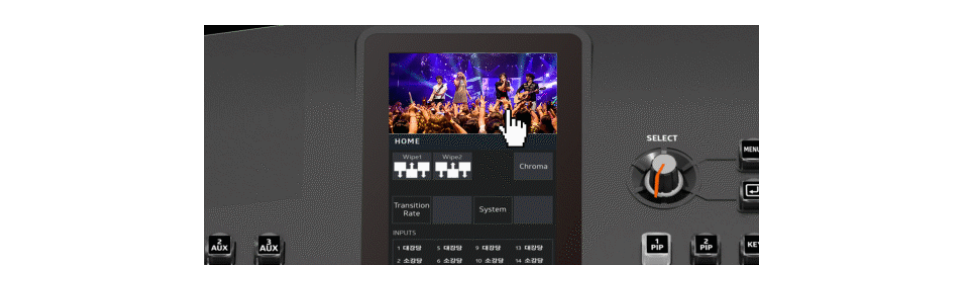
Intuitive LCD Touchscreen and Joy-stick control

All key menu or functions can be adjusted with touchscreen smoothly and extremely easily operated with rotary switch or Joy stick.

ezpro 10 joy

All 10 inputs built in in Scaler

ez-Pro VS10 comes with internal scalers in all input ports. Adjust freely using our touch screen menu.

ez pro 10 b

Twice the Basic Features

ez-Pro VS10 has 2 Picture in Picture (PIP) capabilities, 1 Still Image which covers the whole screen, and Luma and Chroma Keyer. You can mix both features and key out the PIP and assimilate a hand language translator PIP.

ez pro 10 v

Quiet Fan for your comfort

LUMANTEK carefully calibrated the fan noise to provide more comfort to its users while enabling the switcher to operate at its maximum performance.

ez pro 10 l

Any ports are Fill & Key

VS10 allows to set any SDI input ports as Fill or Key.

ezpro port 3

Transfer with USB disk

It is easy to transfer your settings to VS10. Use the VS10 Utility software to save settings into your USB disk. Then plug the USB into VS10 to transfer settings, media, and new firmware.

ez pro 10 program multiview

PROGRAM/ MULTIVIEW display at LCD screen

LCD screen is able to display Program and Multiview when you touch the screen.

ez pro ldc

Click Here for More Information


ProMix-1: Your Gateway to Professional Remote Audio Production

Promax avw


Are you seeking a versatile and efficient solution for your remote broadcast or podcasting needs? Look no further than the ProMix-1, a single-channel audio remote/podcast mixer designed to elevate your audio production to new heights. Packed with advanced features and seamless connectivity, the ProMix-1 is the go-to choice for broadcasters and podcasts alike.


PROMIX AVWAZ


Key Features of ProMix-1

 1. Single Microphone Input Channel
The ProMix-1 provides a single microphone input channel, ensuring crystal-clear audio capture for your broadcasts or podcast recordings. With its precise signal processing, you can expect professional-grade sound quality that impresses your audience.

2. Balanced Monaural Program Output with Defeat-able Soft-Clipper
Enjoy a balanced monaural program output with a defeat-able soft-clipper, providing distortion-free audio playback. Your listeners will appreciate the clean and clear audio delivery, enhancing their overall experience.

3. Built-in USB Codec for Computer Audio Playback and Recording
With the ProMix-1’s built-in USB codec, seamless computer audio playback, and recording become a breeze. Easily integrate your audio content with various software applications, making editing and post-production tasks a smooth process.

4. Full Duplex Talk-Back Capability
Stay connected and in control with the ProMix-1’s full duplex talk-back capability. Facilitate real-time communication between your team members, ensuring smooth coordination during live broadcasts or podcasts.

5. IFB Audio Input with Level Adjustment
The ProMix-1 offers an IFB (Interruptible Fold back) audio input with level adjustment. This allows you to customize and monitor your audio feed, ensuring that everyone involved in the production stays informed and on point.

6. Custom Headphone Mixes
Create personalized listening experiences with the ProMix-1’s single 1/4″ stereo headphone outputs. With independent volume, IFB pan, and program pan controls, you can craft custom headphone mixes tailored to each individual’s preferences.

7. Remote Channel Control and Status Connector
Stay in command of your audio setup with the ProMix-1’s remote channel control and status connector. Effortlessly manage settings and monitor the mixer’s performance, guaranteeing flawless production every time.

8. Expand ability with ProMix Hub-6
For larger productions, the ProMix-1 can be seamlessly combined with additional ProMix 1’s and/or ProMix 4 units using the ProMix Hub-6 and standard Cat5 cables. This expand ability ensures scalability and versatility for any project size.


PROMIX AVW NZ


With the ProMix-1 as your audio companion, elevate your remote broadcasts or podcasts to unparalleled levels of excellence. Its feature-packed design, user-friendly interface, and expandability options make it a valuable addition to any audio production setup. Don’t miss out on the opportunity to enhance your audio content with the ProMix-1 – your gateway to captivating and professional audio experiences.


More Information

» ProMix-1, a single-channel audio remote/podcast mixer– Users Manual (PDF)
» Promix-1 Technical Specifications


The Glory Star INFINITUS In-Cell Touch Screen: Thinner, Lighter, and More Versatile

glorystar infitus a

The Glory Star INFINITUS In-Cell Touch Screen is an innovative display technology not just another screen; it’s a revolution in form and function for businesses looking to enhance their customer experience in large format displays of 32” and 43”.

Glorystar Infitus

It can be installed in portrait, landscape or face-up orientation that offers exceptional color performance, high contrast and wide viewing angles. Plus, having a standard of 60950- 1 ball drop proof testing standard makes it a durable large format display.

Glorystar infitus c

with its state-of-the-art slim design and integrated power supply, it’s easy to set up and use while also reducing power consumption and heat to enable thinner and smaller kiosk designs for various applications in retail, hotels, gaming, transportation, and other commercial uses. Featuring anti-fingerprint and anti-glare touch glass, a fast and sensitive response and a sleek metal housing and bezel that provide better durability and protection against damage, it’s perfect for applications like gaming tables, digital white boards and corporate signages.

glorystar infitus r

Slimmer and Lighter than Eve

One of the standout features of the Glory Star INFINITUS In-Cell Touch Screen is its incredible slimness. It boasts a frame bezel that is a jaw-dropping 73% thinner than traditional LCD touch screens. Moreover, it’s 50% lighter, making it a delight to handle and install.

glorystar infitus k

All-in-One Technology

The magic behind the INFINITUS In-Cell Touch Screen lies in its ingenious combination of touch glass and LCD display into a single layer. This integration results in a thinner, lighter, and more efficient form factor. It’s not just about aesthetics; it’s about delivering a superior visual experience. With this technology, you can expect sharper and more vibrant colors and enhanced visibility, setting it miles apart from traditional LCD screens.

glorystar infitus l

Seamless Compatibility

It seamlessly integrates with both Android and Windows platforms, allowing you to use your favorite applications or harness its computing power with ease.

glorystar infitus m

Visual Excellence

The impressive features don’t stop there. The slim edge enhances the panel display area, while HDR technology ensures you see every detail in both bright and dark captures. You’ll experience a high contrast ratio and a mesmerizing 4K display, all on a multi-touch screen with high transparency anti-glare glass. Whether you’re viewing up close or at an angle, optimal clarity is guaranteed.

glorytar infitus h

Built to Last

With its metal housing and edge-to-edge glass, the Glory Star INFINITUS is ready for any commercial environment. Whether you want to mount it on a wall or encase it in a kiosk, it’s built to last, ensuring durability and aesthetics go hand in hand.

In conclusion, the Glory Star INFINITUS In-Cell Touch Screen is not just a display; it’s a leap forward in technology. Its slim design, compatibility with popular platforms, and stunning visual features make it a top choice for various applications. Whether you’re upgrading your business’s display or enhancing your personal computing experience, the INFINITUS In-Cell Touch Screen is a choice that promises excellence.


learn more