RDL Made in America. Made for Everywhere!

4 x 1 STEREO AUDIO SWITCHING IN A CLASSROOM

Remote Source Selection and Volume Control

The classroom is equipped with three A/V sources (Computer, DVD and VCR) and an audio-only input on a wall plate. Staff selects the audio source and sets the level through the RDL RU-ASX4DR Remote Controlled Audio Selector using a D-RC4M Four Channel Remote Control and a D-RLC10M Remote Level Control. All video signals are run directly to the projector which provides video source selection. Sources may be muted by simply de-selecting the active input at the D-RC4M or by operating the MUTE switch on the D-RLC10M. The D-CIJ3D Consumer Input Jack Panel is used to balance the stereo signal of an MP3 player or any consumer source and to provide galvanic isolation.

4 x 1 STEREO AUDIO SWITCHING IN A CLASSROOM


Add a Versatile, High-Quality Audio Attenuator to Any Sound System: RDL RU-VCA2A

RDL RU VCA2A BNR
 

If you’re in search of a versatile and high-quality audio attenuator to enhance your sound control capabilities, consider exploring the RU-VCA2A Digitally Controlled Attenuators by RDL. These attenuators are designed to manage mono or stereo, balanced or unbalanced line-level signals with exceptional precision. They feature noiseless digital attenuators that offer precise and dependable level adjustments in 0.5 dB increments, delivering outstanding low-noise performance for even the most demanding applications.

RU VCA2A

Level control can be easily executed either internally through the front-panel pushbuttons or remotely using single or multiple control units. These remote control units offer various options, such as pushbuttons, momentary pulses (rotary encoder), or voltage control ranging from 0 to 10 Vdc, or a 10 kΩ Potentiometer.

For added convenience, you can establish a custom preset level and swiftly recall it by simply pressing the front-panel GO TO PRESET button. Among the wide array of remote control options available for this unit, the D-RLC2 Remote Level Control stands out as a popular choice. This remote is equipped with two momentary pushbuttons, UP and DOWN, and a 10-segment LED visual level display. Pressing these buttons sends the corresponding signals to the RU-VCA2A, and simultaneously pushing both buttons restores the level to the PRESET setting.

Additionally, you have the flexibility to configure this module to power up at either the preset level or the last used level setting. Installation and operation of the RU-VCA2A are straightforward, making it compatible with various RDL remote controls or OEM equipment. Whether you require precise level adjustments for microphones, instruments, line sources, or speakers, the RU-VCA2A offers a seamless and accurate solution. Elevate your audio control capabilities with ease by incorporating the RU-VCA2A into your setup.

Untitled


Enhanced Live Event Switcher ez-Pro VS10: Expanded Ports and Advanced Control for Multi-Screen Monitoring

ez pro 10

More Switcher for Everyone!

Again, LUMANTEK gives you another switcher good for live events but with more ports than before. More screens to monitor in a single switcher with a larger touch screen to control.

ez pro10


Customizable video switcher for your preference.

  • You can choose from many layouts to show the multiview screen.
  • You can move them as you want and name as you want.
  • Configure your own layout through our utility (Win OS or Mac OS), save it on a USB disk, and plug it into VS10 to load your layout.

ezpro multiview

Perfect harmony with ez-CGER mini for live titling and graphics!

  • All ez-Pro VS10 SDI inputs can take in Fill & Key signals.
  • Connect LUMANTEK’s “ez-CGER mini” with ez-Pro VS10 and broadcast your video with Live Titling and Graphics!

ezpro customize

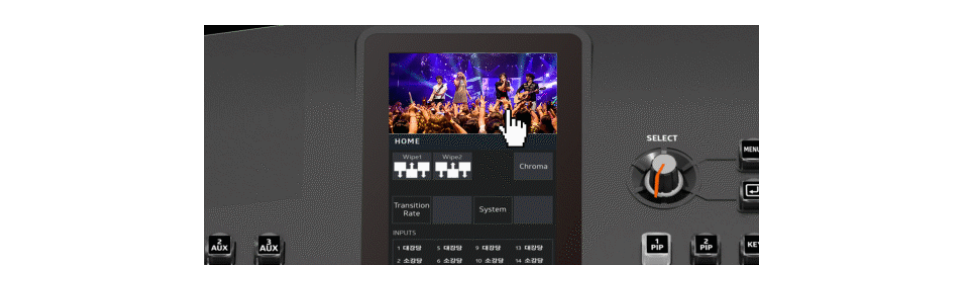
Intuitive LCD Touchscreen and Joy-stick control

All key menu or functions can be adjusted with touchscreen smoothly and extremely easily operated with rotary switch or Joy stick.

ezpro 10 joy

All 10 inputs built in in Scaler

ez-Pro VS10 comes with internal scalers in all input ports. Adjust freely using our touch screen menu.

ez pro 10 b

Twice the Basic Features

ez-Pro VS10 has 2 Picture in Picture (PIP) capabilities, 1 Still Image which covers the whole screen, and Luma and Chroma Keyer. You can mix both features and key out the PIP and assimilate a hand language translator PIP.

ez pro 10 v

Quiet Fan for your comfort

LUMANTEK carefully calibrated the fan noise to provide more comfort to its users while enabling the switcher to operate at its maximum performance.

ez pro 10 l

Any ports are Fill & Key

VS10 allows to set any SDI input ports as Fill or Key.

ezpro port 3

Transfer with USB disk

It is easy to transfer your settings to VS10. Use the VS10 Utility software to save settings into your USB disk. Then plug the USB into VS10 to transfer settings, media, and new firmware.

ez pro 10 program multiview

PROGRAM/ MULTIVIEW display at LCD screen

LCD screen is able to display Program and Multiview when you touch the screen.

ez pro ldc

Click Here for More Information


AVMATRIX Portable 10.1 inch 4-CH SDI&HDMI Video Switcher -PVS0403U

PIC5
PVS0403U is a 4-channel HDMI & SDI multi-format video Switcher with a 10.1 inch FHD IPS LCD monitor.It supports various functions including video switching, audio mixing, PGM/ multiview/ Aux out, different transition effects, Luma Key Chroma Key, DSK, LOGO, PIP/ POP, media library, pattern and color generator, etc. Inputs support multi-format, PGM output can be scaled, compatible with a variety of equipment. The unit supports stream performances and presentations on PC through the USB-C port.

PIC1

Rich Interface
2xSDI and 2xHDMI inputs, 2xHDMI PGM output, 1xHDMI multiview out, 1xUSB type-C output.and the interface is hidden in the case, which can protect the interface from being damaged.

PIC 2

Scaled output & Multiview

Flexible to accept 4 input sources with different format and frame rate, with buid-in scalar, PGM output can be scaled to 1080i and 1080p. Multiview output make it easy to monitor 4 channels sources as well as PVW and PGM simultaneously on one display,

Scaled


USB Capture for Streaming

Connect the switcher to a computer with windows 7/8/10. Mac OS via USB capture output, and use software like OBS, PotPlayer, VMix, etc, to realize live streaming in Youtube, Facebook, Twitter, etc. Platforms.

test4


2PIP/POP

The switcher has 2 PIP function that it can overlay 2 sub-screen into the PGM out, and the size and position of sub-screen can be adjusted. Besides,user can use POP to have two same-size screens overlay into PGM out.

pnp


USK & DSk

The switcher supports chroma key and luma key, which is convenient for users to key off blue/green and black background colors for virtual studio or live event applications. besides, User can gain an exact color level by using the color picking , clip and gain key adjustment.

ne


LOGO Overlay

User can add a logo from USB flash disk into PGM. The Logo’s size and position can be adjusted, and the logo image can be PNG, JPG, BMP, etc, and format.

logo


Transition Effects

There are WIPE (11×2 patterns), MIX and DIP transition effects available from the switcher. The transition effect works for switching via AUTO and T-Bar. User also can have transition without effect by switching via CUT.

transi


Audio MIXING / AFV

The Switcher can mix 2 HDMI and 2 SDI embedded audio and 2 external analog audios (Mic/Line-level) into the PGM out. User can turn on/off or adjust volume or audio delay for each audio independently. In addition, 2 HDMI and 2 SDI embedded audios can be set to AFV mode.

news5


Media Management

The Video Switcher has a powerful built-in media management function with 39 preset patterns, User also can import image from USB flash disk, or Capture and store the screenshot image

mag


PC Control Software

A Free PC Control Software can be downloaded from website. User can remotely control all settings of the device through the control sofware, including transition effects, audio configuration, multi view settings and media management, etc.

test


Widespread Application

The video Switcher can be widely used in various field events, such as live sports, virtual studio, education, church, internet, concert, and so on.

test2

Main Features

  • 10.1 inch FHD IPS LCD monitor
  • 2 channel auto-detected HDMI inputs and 2 SDI inputs
  • 2×HDMI PGM output,1×HDMI multiview out, 1×USB type-C output
  • All outputs are configurable and assignable
  • USB for capturing and streaming on PC
  • Upstream key: Luma key, Chroma key, PIP×2/ POP
  • Downstream key and LOGO overlay
  • T-bar/ Auto/ Cut transitions; various effects: WIPE(11×2 patterns)/ MIX/ DIP
  • Audio mixer: 2×SDI, 2×HDMI embedded audio and 2×MIC/line In; audio delay available
  • Media library: 39 default patterns, 16 imported images, 16 captured images, 2 color generators
  • LAN port for PC software remote control
  • FTB/ MUTE/ STILL/ GPIO for tally
More Information

» Avmatrix Portable 10.1 inch 4-CH SDI & HDMI Video Switcher– Users Manual (PDF)
» PVS0403U Technical Specifications (PDF)