
|
Author: Bharath

NDI Cameras
| Introducing our NEW stocked range of PTZ cameras supporting NDI|HXNetwork Device Interface (NDI) is a free protocol for high-efficiency video streaming over IP, developed by NewTek. It is designed to allow high quality, low latency distribution of live professional video over an existing LAN infrastructure, freeing users from hardware constraints while providing the benefits of reduced cost and deployment time. Integration with almost any software application is as simple as installing the free NDI Tools software package. |
Check here: More info on NDI |More info

Seven Audio Devices in One
| The Aphex Channel high-performance channel strip incorporates seven powerful devices within a compact, single rack space design, including five of Aphex’s exclusive patented technologies to deliver the superb audio quality, processing power and flexibility. Its elegant front panel is laid out in an intuitive, easy-to-use workflow and offers an instrument input, dedicated output and gain reduction metering, front panel sample rate and clock source selection, as well as a reference quality internal clock.
_ More info | Product Sheet | Product Video | Special Price $899 Ex GST $1564.35 |

What is NDI
Network Device Interface and it is a high quality, video-over-IP standard developed by NewTek to enable video-compatible products to communicate, deliver, and receive high-definition video over a computer network ideal for live video production.
Many video projects use NDI to send and receive video over IP. NDI features an auto-discovery feature which makes managing video sources available on a network very easy; for example, a church may use NDI to send PowerPoint slides from one computer and receive them on another computer used for live streaming. Another example would be setting up a display in an office to show an NDI source coming from video production software like OBS. Any Windows or Mac computer can receive the NDI video stream and display it on a TV located in a facility.
What is an NDI camera used for?
NDI cameras often have PTZ (Pan, Tilt and Zoom) functionality which takes advantage of the two-way communication capabilities of NDI. In this way, NDI cameras can be controlled over the same single ethernet cable used to send audio and video. For example, a PTZOptics NDI camera can use a single ethernet cable to power the camera, control the PTZ functionality of the camera, and to send audio and video to a source on the network.
What is the difference between NDI and SDI?
SDI is a technology that has been around for decades. SDI stands for Serial Digital Interface, and the cable itself is capable of sending uncompressed video long distances. NDI is a much newer technology that uses the latest video compression methods to make sending and receiving high-quality video possible over standard computer networks. An SDI camera video feed can be converted into an NDI stream and sent over the network. An NDI video feed can also be converted into an SDI video output and plugged into a monitor.
What is OBS NDI?
OBS, which stands for Open Broadcaster Software, is a free, open-source video production software available at OBSProejct.com. OBS is the world’s most popular live-streaming software and it is supported by a worldwide network of developers. Palakis is a developer who has created a plugin for OBS which supports NDI. This plugin is available for both Mac and PC versions of OBS and it adds simple support for audio/video inputs and outputs over IP inside of OBS. This allows OBS users to add NDI sources into OBS just like any source. It also allows OBS to transmit the main program video via NDI to other systems and finally provides a special OBS filter which can be used to output any OBS source via NDI.
How do I set up an NDI camera?
Most NDI cameras are plug and play when it comes to setup. NDI cameras can be plugged into any LAN (Local Area Network) and configured to operate with any software or hardware solution that supports NDI. Once an NDI camera is plugged into the network, it will show up as an available source on your network; therefore, the friendly NDI name that you give your camera will show up in any software or hardware solution when you click the “add NDI source” option.
You can watch the TeleDelta NDI camera setup video to learn more about this process.
That’s it for this back to the basic video. Don’t forget to subscribe to learn more about video production. You won’t become a video production expert overnight and following along with our team could be a useful tool for you.
NDI bandwidth requirement
The required bandwidth for NDI transmission will vary, depending on resolution and frame rate. The NDI encoding algorithm itself is resolution and frame-rate independent, and supports resolutions up to 4K and beyond. With its high-end performance over standard GigE networks, it makes it possible to transition facilities to an incredibly versatile IP video production pipeline without negating existing investments in SDI cameras and infrastructure, or costly new high-speed network infrastructures.
How efficient is NDI in video compression?
NDI uses compression to enable transmission of video streams in the network.
According to NewTek, NDI is one of the most efficient codecs in existence.
“NDI achieves significantly better compression than the majority of codecs that have been accepted for professional broadcast use. On a typical, modern Intel-based i7 processor, the codec is able to compress a 1920×1080 video signal at 250 frames per second using a single core.
The peak signal-to-noise ratio (PSNR) of the NDI codec exceeds 70dB for typical video content. Uniquely, and importantly, NDI is the first-ever codec to provide multi-generational stability. This means that once a video signal is compressed, there is no further loss.
NDI has a technical latency of 16 video scan lines, although in practice, most implementations would be one field of latency.”
NDI Formats
NDI supports all resolutions, frame rates and video streams, with and without alpha channel.The most common implementations are expected to utilize 8-bit UYVY and RGBA video, however, support for 10-bit and 16-bit is available. The internal pipeline of the codec is maintained entirely at 16-bit or better.
How do you add NDI to your network?
NDI works on standard IP based networks, where the requirements to make specialized configuration is close to zero. This is because the NDI-enabled devices behave like any other device connected to the network.
While the NDI integration is designed to be as painless as possible, there are some important elements to know what NDI does. The following part is taken from the NewTek documentation “Adding NDI to your network”:
- NDI uses mDNS for automatic discovery and registration of devices on a network
- NDI will deliver the IP address and ports of source devices to destinations via a broadcast response
- The mDNS Ethernet frame is a multicast packet that broadcasts to IPv4 address 224.0.0.251 and utilizes UDP port 5353
- NDI implementations released prior to October 2016 may only have automatic discovery available as an option
- NDI includes a messaging server to allow for direct discovery
- The NDI messaging server utilizes TCP port 5960
- NDI video streams commence on port 5961, with subsequent ports assigned sequentially based on the total number of NDI streams available on a system

Yes, We are open for business with contactless payments
Email: Sales@localhost | Auckland: 09 271 4000 | Wellington: 04 499 3888

Virtual Remote Control Panel for SMP Series
Easily Control Recordings From Any Device
vRCP for SMP Series
Extron is pleased to introduce vRCP, a new Virtual Remote Control Panel, which enables remote control of any Extron SMP Streaming Media Processor using the browser on any mobile device. Simply install the free vRCP FlexOS App on your SMP Series products to give users access to common functions like starting, stopping, pausing, and marking recordings.
“We recognize the increasing need for the flexible remote control that offers users the ability to bring their own device and leverage it for in-room AV control,” says Casey Hall, Vice President of Worldwide Sales and Marketing. “That’s why we created the new, free vRCP app, which places SMP device control directly into the hands of presenters using a familiar device, wherever they are in the room, and alleviating the need to touch AV control surfaces.”
With the vRCP FlexOS App, users can remotely control SMP Series products without the need for a physical RCP 101 remote control panel, or it can be used in conjunction with an RCP. This enhancement empowers presenters to walk freely around a room while using their personal devices for simple control and operation of SMP devices, simplifying the creation of recorded content for online learning and virtual classrooms.
Features
- Remotely control SMP products using any mobile device browser, without an RCP, or in conjunction with an RCP
- The status indicator displays active alarm name, so the user can view the active alarm that relates to the recording on the mobile page.
Alarms include:
Video Loss
HDCP Video
Audio Loss
Record Halt
Disk Space
- Display record elapsed time to show how long the recording has run
- Display record remaining time to show the remaining time before a recording will end, determined by either the unused storage space or the next scheduled recording start time
- Display SMP recording status including stopped, setup (preparing for a new recording), recording, or paused
- Display SMP device name and location on a mobile browser page to ensure the correct SMP unit when managing multiple SMP devices
>>>>>>>>>>>
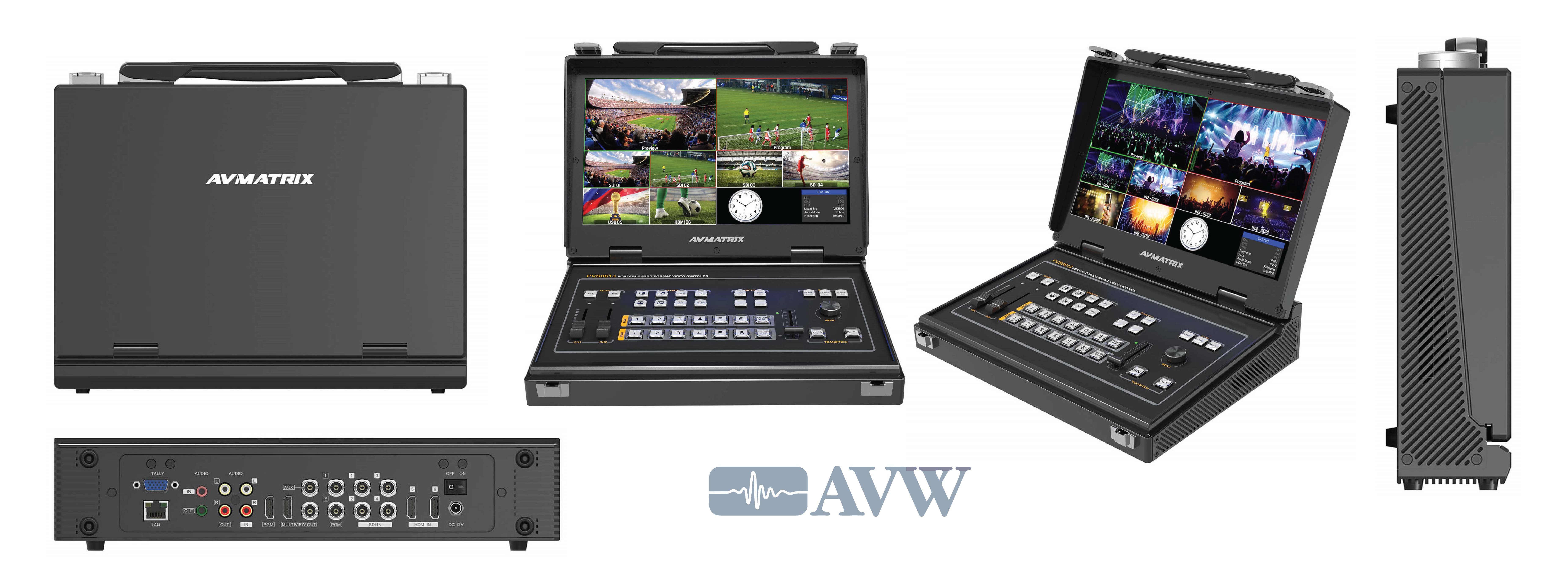
AVMatrix Portable 6CH SDI/HDMI Multi-format Video Switcher
Portable 6CH SDI/HDMI Multi-format Video Switcher
User Manual | Related Products
- Inputs: 4×SDI and 2×HDMI inputs
- Outputs: 2×SDI &1×HDMI PGM, 1×SDI PVW, 1×SDI & HDMI multiview
- 13.3-inch FHD LCD monitor
- Portable design, metal case
- T-Bar/ AUTO/ CUT transitions and MIX/ FADE/ WIPE effects
- PiP mode, both size and position is adjustable
- Audio mixer: 3.5mm stereo/ RCA audio & SDI/ HDMI embedded audio
- GPIO interface for live tally system
- FTB for emergency situation
AVW today announced that its Board of Directors has appointed Mr Lloyd Freeman as Director for AVW Ltd
Auckland, NZ, Press Release: July 1, 2020.
AVW Ltd Managing Director Murray Hunt is pleased to announce an acceptance from Lloyd Freeman to join the Board of AVW Ltd.
We are pleased to welcome Lloyd as the new company director. “Lloyd’s proven ability and commitment to AVW’s team, customers, partners, products and philosophies will complement the Boards strengths and governance; further reinforcing AVW’s business, well established now in its 38th year. “
Lloyd’s appointment is effective immediately and will assist the management and direction of the company.

About Lloyd Freeman
With more than 20 years in the AV Industry, Lloyd has held a variety of leadership positions and is widely known and respected both in New Zealand as well as the international stage. He brings experience and success in leading Marketing and Sales teams, both at a Head Office level as well as a branch network level including agencies.
Known for his leadership qualities, professionalism and success in this industry, Lloyd has worked closely with industry leader, Extron Electronics, since 2000. He continues to be involved in numerous large projects, both at tertiary, government and corporate markets.
Active with the promotion of the Tertiary Technology Forum in New Zealand for 14 years, Lloyd’s endeavours established it as an industry icon with manufacturers from around the world requesting an invitation to attend. This forum brought the industry and key people from all Universities, PTEs & Polytechnics in New Zealand together.
AVW Limited is a major supplier of technical goods and services to the Broadcast, Pro Audio, AV and ICT industries in New Zealand, Australia, Pacific Islands and Southeast Asia. We pride ourselves on representing quality brands and strive to provide outstanding customer service and support
Minrray UV570 Video Conferencing Camera
|
|
|
Contact
Ack: 09 271 4000 Wel: 04 499 3888
Login | Create an Account
Make one in 30 seconds without any annoying questions

How Bluetooth Tech Can Improve the Indoor Guest Experience
The D SERIES-BT1A modules are Bluetooth audio receiving modules compatible with RDL® Format-A twisted pair receivers. When paired with a compatible Bluetooth enabled device, the module receives stereo audio from the Bluetooth source. The stereo signal is sent through two Format-A pairs to any RDL Format-A receiver. A stereo/mono switch set by the installer permits summed mono audio to be sent over one switch-selected pair to the Format-A receiver.
