We’re excited to introduce our latest complete interactive solution: the elegant Floor Stand paired with our high-performance Glory Star Touchscreen displays.
We are introducing and announcing the immediate availability of the TLS 835M and TLS 1035M scheduling panels. These new panels deliver a streamlined, scalable solution for smarter workspace management as part of a complete Extron scheduling system. They work seamlessly with Extron Wayfinding, status indicators, and control systems to provide a unified view of room availability and AV status across the enterprise. Users can easily book, check in, release, or extend meetings directly from the touchpanel or a wide selection of Extron devices, while viewing and scheduling meetings up to one week in advance. The high-resolution capacitive IPS touchscreens with optically bonded Gorilla® Glass lens ensure enhanced brightness, wide viewing angles, and precise touch accuracy, while integrated red and green LED indicators provide clear, at-a-glance room status. Finally, PoE combines power and data into one cable, minimizing cable clutter and streamlining installation.
Key Features
Available in two sizes, 8″ and 10.1″
Responsive, fully customizable user interface supports modern branding and enhances functionality
Enhanced user experience with improved touchpanel brightness, viewing angles, and color accuracy as well as vibrant LED status indicators
Extron Wayfinding, status indicators, and control system integration for seamless scheduling and smart control
Schedule or view meetings up to one week in advance
Seamless direct integration with popular calendar systems
A case study provided by our team in sales support, Marcus and Jolanda. Here they have integrated four Glory Star commercial tablets to transform their boat home to an amazing smart vehicle.
We bought our 1986 Jefferson 52 two years ago to live full time on that boat. We love the layout of the boat, but we knew that it will need some serious upgrades, on our list were the instruments for navigation and engine monitoring which were very basic. Especially the old “steam gages” did not fully function any more. In addition I wanted to have a smart home solution to control the lights and heating.
The boat is equipped with two diesel engines, one generator, diesel heaters, autopilot, radar, GPS and depth sounder.
The following items where on top of my list to update:
Control the lights and heating with a touch panel (smart home)
Electronically monitor engine parameters to verify manual gages
Update navigation plotter to be able to use the latest charts
Monitor the batteries
Display weather information
To access all the information, I set up a wireless router to connect all devices, installed an analog/digital converter and connected all sensors via a bus system (NMEA 2000).
All functionalities can be controlled and monitored by the Glory Star touch tablets.
To display and interact with all the systems I used the Glory Star VEGA (for smart home), Nebula 15” (for weather information and engine monitoring), Jarvis 10” (for battery monitoring) and the Ultron to access the navigation app. The iPad is only used for home entertainment (music).
The big advantage from the Glory Star products is that they are easy to install, commercial grade housing, runs with Android (most of the applications run on the tablets) and the touchscreen is very easy to use. Also they are not using much power, the batteries on boats are very limited.
My wife and I have been on some trips and we felt that the new setup works much better now. Of course in boating no project is ever finished so I’m planning to replace all manual gauges with touch screens and also upgrade the radio. Stay tuned for the next level for the upgrade.
We are now shipping our new SSI 100 System Status Indicator. This versatile, multi-colored backlit indicator can be used for a broad array of applications within nearly any environment. It brings visibility to room occupancy, activity, safety protocols and dozens of other applications. The SSI 100 connects seamlessly to Extron control systems, calendaring systems, and room occupancy sensors, with no licensing required. The two-sided, acrylic lens combined with multi-color backlighting blends simplicity with architectural appeal. In addition to blank wall and ceiling mount versions, optional kits allow customization with engraved text, such as a room name, classroom number, or company logo. The SSI 100 offers easy installation, with the flexibility to be powered either locally or through a single Power over Ethernet (PoE) cable.
The SSI 100 is ideal for use in a wide range of applications where at-a-glance status can enhance workflows. This includes environments such as studios, esports facilities, hot desking areas, meeting rooms, labs, instructional spaces, and command and control centers. For standalone applications, the SSI 100 indicates room status using an occupancy sensor without the need for additional software or Extron products.
Key Features
Visual real-time illuminated status from a distance
Configurable multi-color backlighting
Wall mount and ceiling mount versions available
Optional kit provides custom engraving
Powered via PoE or locally via optional power supply
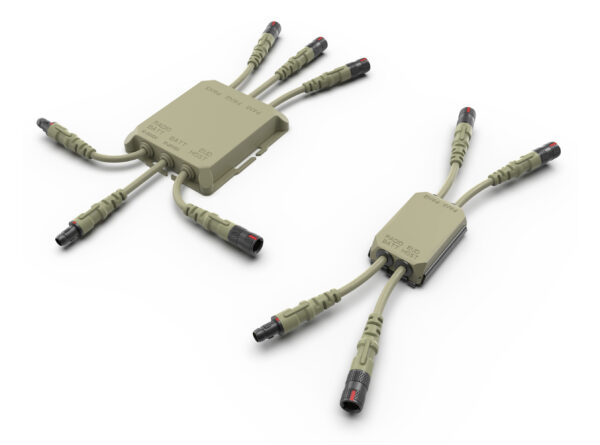
Fischer Connectors has expanded the standard cable catalog for its KEYSTONE tactical power and data hub with three new assemblies that enable the integration of key soldier devices used in dismounted operations.
The Swiss company continues to push the boundaries of battlefield connectivity, with its R&D team developing a comprehensive portfolio of cable assemblies designed to meet the demands of modern warfare. These new products address the connectivity and interoperability needs of soldiers using C4ISR systems in dynamic operational environments.
“Our goal is to meet strong customer demand for seamless connectivity and interoperability of soldier-worn C4ISR communications and battlefield equipment,” explains Olivier Thormann, Product Manager for Fischer KEYSTONE. “Customers rely on our power and data hubs as robust plug-and-play solutions for key soldier devices that enable real-time communication, intelligence gathering, and precision engagement.”
Following the February 2025 update that introduced cables for EUDs, batteries, and ergonomic enhancements (see news of February 19, 2025), Fischer Connectors is now focused on supporting key tactical devices with tailored cable solutions.
New cables for core battlefield devices
In April, Fischer Connectors introduced new cable assemblies for the KEYSTONE hub compatible with Nett Warrior systems and NATO STANAG 4695/4851 (via Fischer UltiMate™ 80 connectors). These cables interface with three mission-critical devices used in dismounted operations:
Vectronix PLRF25C – A compact, lightweight (430g), rugged laser rangefinder designed for precise long-range measurements. It supports snipers, spotters, forward observers, and recon teams in target acquisition and location. The new cable features an RS-232 to USB converter, offering a maximum data rate of 1 Mbit/s.
Vectronix Moskito TI – A lightweight multi-purpose system that integrates a thermal imager and laser rangefinder, offering forward observers and special forces accurate target location and enhanced situational awareness. The new power/data cable with Ethernet connection features a Fischer UltiMate™ 80 connector on the hub side and Fischer Core 1031 and 102 connectors on the device side. Users can take full advantage of Moskito TI’s capabilities with the Ethernet connection, which now allows video feeds to be retrieved from the binoculars and metadata to be added to designated targets in accordance with MIL standards.
MOHOC® 2 IP Camera – Widely adopted in the defense sector, this low-profile helmet camera enables real-time video streaming over IP-based networks and radios. The cable assembly includes an Ethernet/USB converter and features a durable PUR outer sheath that is halogen-free and flame-retardant to meet harsh-environment requirements.
Seamless integration and multi-device interoperability
Fischer KEYSTONE™ delivers streamlined connectivity and efficient power management for soldier-worn digital equipment. It helps teams and commanders stay connected and power their devices, providing real-time situational awareness and improving decision-making and operational effectiveness in dynamic environments.
The KEYSTONE hub supports USB 2.0 and SMBus data channels along with up to 100 W (5 A max) of power distribution – all managed through a lightweight, ergonomic interface. The KEYSTONE 6 hub also includes an intuitive power management app, usable as a standalone app or as an ATAK plug-in on the soldier’s EUD.
Both the KEYSTONE 6 and 4 hubs benefit from a broad array of standard and customizable cable assemblies supporting Nett Warrior and NATO STANAG 4695/4851 standards. The expanded cable ecosystem includes extensions, adapters and interconnects for EUDs, radios, and battlefield devices:
General-purpose and power cables: USB 2.0, RS-232, Ethernet, Nett Warrior type and BB-2590 batteries, right-angle overmolded cable options
Radio cables: Silvus, Bittium, L3 Harris, DTC CODAN, Thales
EUD cables: Standard USB-C right angle and assemblies compatible with Juggernaut cases
Device cables: For MOHOC® 2 IP Camera and Safran Vectronix’s target acquisition and range finding systems (PLRF25C, MOSKITO TI, STERNA True North Finder), and others upon request.
A competitive edge in soldier modernization
The Fischer KEYSTONE™ offers a Swiss-engineered alternative to the U.S. Army’s Next Generation Hub (NGH), delivering Fischer Connectors’ technologies in MIL-spec ruggedness, compact design, sealing, and high-speed data transmission. It stands as a comprehensive connectivity platform that meets the rigorous demands of soldier modernization and digital transformation programs such as U.S. Army 2030.
More information on Keystone please speak with AVW Australia / New Zealand
New cameras build on proven advantages of earlier Explore models with even smoother motion, powerful new features and redesigned web user interface
Shenzhen, China – June 3, 2026 — Telycam, a leading PTZ camera manufacturer serving both the ProAV and broadcast markets, today unveiled the company’s latest lineup in its broadcast-class Explore series: the Explore 100, Explore 300 and Explore 500.
Building on the hallmarks of the award-winning Explore family, these new models deliver outstanding image quality, precise focus, and smooth mechanical movement across a wide range of production scenarios. Ideal for sports broadcasts, corporate events, educational applications, and live production environments, the new launches reinforce Telycam’s commitment to empowering professional productions with high-performance, reliable, and versatile PTZ cameras.
Visit Telycam at InfoComm 2026
Telycam will showcase the new cameras in both N7957 at the InfoComm 2026 and exhibition, taking place June 17 to 19 in Las Vegas.
The Explore 100 and Explore 300 represent the next generation of Telycam’s Explore SE and Explore XE cameras, respectively, while the Explore 500 is the newest evolution of the previous top-of-the-line Explore model.
All three models deliver improved performance with advanced features including Telycam’s new Brushless DC motor and 3-axis synchronization, designed to eliminate robotic movement and deliver fluid, natural camera motion—perfect for broadcast-quality production.
The Explore 300 and Explore 500 are equipped with a 4/3’’ sensor and 20x optical zoom, coupled with industry-leading Hybrid AF for exceptional low-light performance and fast, accurate autofocus. Both models also incorporate an OLPF (optical low-pass filter) lens to minimize moiré effects when shooting in front of LED walls, enhancing virtual production and digital content creation. Meanwhile, the Explore 100 combines a 1/1.8″ sensor with 30x optical zoom as a low-cost entry point to broadcast-grade PTZ capture.
All three models offer a flexible array of output connectivity. The Explore 300 outputs 4K at 60 frames per second over HDMI or NDI® HX3, with 4K at 30 fps available over USB-C and 1080p60 video over 3G-SDI. The Explore 100 and Explore 500 offer the same outputs plus NDI® High Bandwidth, 12G-SDI (with genlock) and SFP+ interfaces. All three models can also stream directly in SRT, RTMP and RTSP, and can record files on an SD card.
Feature / Specification
Explore 100
Explore 300
Explore 500
Optics & Image Quality
Sensor Size
1/1.8 inch
4/3 inch
4/3 inch
Zoom
30×
20×
20×
FOV
63° ~ 2°
71° ~ 4.05°
71° ~ 4.05°
4K 60fps
Yes
Yes
Yes
Hybrid AF
No
Yes
Yes
OLPF
No
Yes
Yes
Video Outputs
HDMI 2.0
Yes
Yes
Yes
NDI HX3
Yes
Yes
Yes
NDI High Bandwidth
Yes
No
Yes
12G-SDI
Yes
No
Yes
3G-SDI
Cropping only
Yes
Cropping only
SFP+
Yes
No
Yes
Sync & Control
Genlock
Yes
No
Yes
FreeD
Yes
Yes
Yes
Auto-tracking
Yes
Yes
Yes
Pan-Tilt & Storage
Brushless DC Motor
Yes
Yes
Yes
3-Axis Sync
Yes
Yes
Yes
Local Recording
Yes
Yes
Yes
The brand-new WebUI for the next-generation Explore models is fully mobile-friendly, making it easy for users to control the cameras remotely from a phone or iPad. It also features four Scene Presets, allowing users to save and quickly recall different image settings for varying lighting and stage conditions. In addition, the new WebUI integrates numerous small enhancements designed to provide a smoother, more intuitive user experience.
Availability
The Explore 100, Explore 300, and Explore 500 are scheduled to be available in Q3 2026. Despite representing significant upgrades over previous Explore models, the new cameras will carry the same original MSRP as their earlier equivalents, delivering more value without increasing cost.
Established in 1990, Temasek Polytechnic (TP) is one of the leading institutions of higher learning in Singapore. Currently, it offers 36 full-time diploma courses in the areas of applied science, business, design, engineering, humanities, social sciences, informatics, and IT. It also offers over 40 part-time courses, up to advanced diploma level. TP students undergo a holistic learning system that combines hands-on experience, character education, and relevant life skills in an enriching learning environment.
The school infuses global realities into its programs and develops a mindset that embraces socio-cultural diversity. Believing in the possibilities of tomorrow, TP is committed to co-creating a better world with its stakeholders by nurturing the next generation of values-centered leaders, lifelong learners, and future-oriented creators.
CHALLENGES
Prior to the COVID-19 pandemic, the audiovisual system available in most classrooms consisted of a projector and a wireless microphone. Since COVID-19, TP adopted HyFlex learning, allowing students to attend lessons in-person, remotely, and on-demand, addressing the dynamic shift of more lessons being conducted online. TP engaged Digiworz Pte Ltd for AV system design and integration services. Digiworz selected Extron to supply AV system switching, distribution, control, and audio equipment to implement the HyFlex upgrades.
Full Teams® Room solutions are rare in Singapore’s educational institutions. We broke new ground with this Teams-based HyFlex AV system design. Extron’s unwavering on-site and remote support got us through every challenge encountered. The end product is an AV system that provides TP lecturers and students with smooth, effective HyFlex teaching and learning experiences that work reliably every day.
DESIGN SOLUTION
Unified Communications Via Microsoft Teams
Ten learning spaces of various sizes and layouts received HyFlex AV system makeovers. The systems are built around the Lenovo ThinkSmart® Core for Microsoft Teams Rooms unified communication (UC) engine. They handle transmission of audio and video between the classrooms and remote students and include built-in Teams application software. The Teams application provides a user interface via a touchscreen control panel to manage interactions between the classrooms and remote students. All Teams application features are available, including session scheduling, session video recording/transcription, screen sharing, chat, file transfer, user reaction emojis (e.g., hand-raising), etc. Classroom AV content processed by the UC engine includes video from the lecturer’s document camera, lesson presentation content from the lecturer’s laptop, video from a classroom interactive display, views of the classroom from PTZ cameras, and sound from classroom microphones. Remote students using computers equipped with webcams have complete telepresence in the classrooms. Remote students are seen and heard by the people in the classroom and vice versa. Completing the HyFlex paradigm, the Teams application records class sessions and saves them on Microsoft OneDrive® or Streams® cloud storage, allowing students to access classes anytime on-demand.
Classroom Displays
Each HyFlex room is equipped with an 86″ touchscreen interactive display that serves as a whiteboard, a standard 86″ secondary display, and a 65″ confidence monitor display. The 86″ displays are wall-mounted for viewing by the students. The 65″ display is mounted on the wall opposite the lectern, providing a direct line-of-sight view for the lecturer.
An MGP 641xi multi-window processor completes the HyFlex experience. It creates multi-window layouts to display up to four video sources on in-room and far-end screens. The multi-window content can include lecture content, images from in-room PTZ cameras, and images from remote students’ webcams.
PTZ Cameras and Beamforming Microphone Arrays
Ceiling mounted beamforming microphone arrays in each classroom capture the voices of lecturers and students. The microphones provide audio to the UC engine to send to remote students. The directional sound from the beamforming microphones allows for automatic PTZ camera tracking of those speaking. There are multiple cameras to capture student activity around the classroom, as well as the lecturer. A DMP Plus audio DSP processor performs acoustical echo cancellation for remote students. Those in the room hear sound through eightSoundField® ceiling speakers driven by a 100-watt four-channel XPA amplifier.
AV System Control
An IPCP Pro control processor integrates with the ThinkSmart UC engine to perform room AV control. The control processor includes LinkLicense for User Interfaces, which allows the ThinkSmart touchpanel at the lectern to work seamlessly with the control processor to operate the AV system. An IP Link® power controller allows the AV system to be turned on and off from the touchpanel.
RESULTS
In line with TP’s Digitalization Plan of fostering a digitally driven educational ecosystem to enable learning in a highly personalized and flexible manner, HyFlex classrooms have given the institution the ability to offer learning options previously unavailable.
The HyFlex classroom learning system facilitates both face-to-face and remote lessons simultaneously. This provides flexibility and convenience for our students to either attend lessons on site or remotely in the comfort of their home.
TP shared with Terence Toh, Assistant Sales Director, Digiworz Pte Ltd that, “The HyFlex classroom learning system facilitates both face-to-face and remote lessons simultaneously. This provides flexibility and convenience for our students to either attend lessons on site or remotely in the comfort of their home. One of the great features of the HyFlex Teams Rooms is that the lessons are recorded. This is an extremely useful feature for our students because they are able to play back lessons for revisions or to catch up if they have missed a lesson.”
This initiative aligns with TP’s focus to become a fully digital institution through its Digitalization Plan (DP). The core motivation of the DP is aimed at improving student and graduate outcomes. Through the DP initiative, TP seeks to fully leverage technologies to create new and greater possibilities.
Huge thanks to Mobile Video Devices, Inc. (MVD) for making this livestream possible! Together, we brought the high school Career and Technology Certification Ceremony to online audiences with a seamless broadcast.
Powered by Telycam’s Explore SE and Vision+ 4KN 30X PTZ cameras, the stream delivered crystal-clear visuals. A robust setup featuring vMix, NETGEAR M4250, and an advanced cellular bonding router from MIRI Technologies (under development by MVD) ensured stable, high-quality streaming.
The Challenge
Streaming a live certification ceremony presented specific technical demands:
Multi-Angle Coverage: The system needed to capture both the stage speakers and audience reactions from various angles to reflect the event’s energy and significance.
Network Stability: A consistent, high-bandwidth connection was essential to transmit video and audio without interruptions, especially in a potentially crowded venue.
Audio Clarity: Clear capture of speeches and crowd sounds required precise audio integration to maintain quality for remote viewers.
The Telycam Solution
To meet the demanding requirements of this live production, we deployed a professional-grade setup featuring video, audio, and network technology:
PTZ Camera System: Telycam’s Explore SE and Vision+ 4KN 30X PTZ cameras provided multi-angle coverage with 4K UHD resolution, 30x optical zoom, and automatic tracking, ensuring clear visuals for both wide-stage views and close-ups.
Live Production & Switching: vMix live production software managed real-time multi-camera switching, integrating stage presentations and audience reactions smoothly for a cohesive broadcast.
Network Infrastructure: The NETGEAR M4250 managed switch ensured stable AV-over-IP transmission, while the MIRI Technologies cellular bonding router combined multiple network connections to maintain a reliable, high-bandwidth stream.
Audio Capture: A Dante-integrated podium microphone delivered clear speech, while a Rode microphone captured audience reactions, providing a balanced and immersive audio experience.
The Result
With Telycam’s PTZ cameras, we successfully delivered a high-quality livestream of the high school Career and Technology Certification Ceremony, with seamless switching and stable connectivity, no complex setup required. This allowed them to focus on capturing and sharing the event with clarity and precision.
Sakura Nursery School Selects TAURI Temperature Check Tablet for Fast, Stress-less, Autonomous Scanning
After experiencing stressful and time-consuming temperature checks that caused traffic jams and lack of proper social distancing the Sakura Nursery School in Japan, selected the TAURI Temperature Check tablet. TAURI is a patented-pending contactless, highly accurate tablet that instantly and autonomously screens the school’s 370 kindergarten students and doubles as a messaging/digital signage system.
“The response to TAURI has been extremely positive,” said Masahiro Hori, Sakura’s principal. “The children happily check their temperature every morning. The parents have said they’re glad that it has reduced the amount of time it takes to do checks, and teachers have one less job to do in the morning. In this aspect, they are back to their pre-COVID-19 work routine.”
The Solution
TAURI combines Glory Star’s expertise of creating and programming commercial-grade tablet solutions with the leading sensor hardware to create a fast, worry-free, and healthy experience. Because TAURI is tablet, it feels familiar and sets users at ease. A student simply walks up to the tablet and it intelligently detects their face from up to three feet away. It automatically begins scanning. Results are delivered in less than 3 seconds. The tablet’s sensor and body heat algorithm ensure a temperature accuracy with a tolerance of +/- 0.5 degrees Fahrenheit (+/- 0.3 degrees Celsius) and a refresh rate of 64Hz.
TAURI solved numerous impediments for Sakura. It eliminated the need for another person to perform scans and prevents any contact with skin. As a result, it helps adhere to social distancing measures while promoting clean surfaces. What’s more, the speed at which it detects helps the school prevent long queues of students and cars. Teachers, students, and parents are able to proceed quickly on with their day with no interruptions.
For many schools, technology purchases need to provide long-lasting benefits to optimize budgets. With that in mind, Glory Star designed TAURI benefits to extend beyond a simple temperature check device. It functions as an affordable, easy-to-use digital signage screen, providing a long-term solution with a greater ROI. When the organization no longer needs to scan temperatures, the capability can be deactivated. The signage feature can continue to provide parents and students with important reminders, information, or sponsor campaigns.
With a recent ribbon cutting, the Moreno Valley Unified School District in Riverside County, California, opened its Cyber Innovation Center at Canyon Springs High School. This is the first center of its kind for a K-12 public school district, according to the National Initiative for Cyber Education. The late Aaron Barnett, IT Director of Moreno Valley USD, and Donna Woods, MSc.Ed., the Center’s current lead instructor, have championed the cybersecurity pathway program since its inception seven years ago. The Cyber Innovation Center is the program’s permanent home. Here, students gain knowledge and skills in computer network maintenance and cybersecurity, earning six college credits and preparing to pass CompTIA A+ and Networking+ certification tests. These certifications are the gold standard for IT skills competency.
Integral to the teaching and esports competition activities at the Center is an extensive audiovisual system powered by Extron switching, distribution, control, and audio, with NAV® Pro AV over IP at the center of AV signal distribution throughout the facility.
CHALLENGES
To create the Cyber Innovation Center, 7,687 square feet of underused auto and wood shop space was converted to a technology-rich teaching venue. The main teaching spaces are an Esports Computer Lab, a Cyber Classroom, and a Cyber Innovation Lab. These serve as classrooms and as competition venues for esports and CyberPatriot National Youth Cyber Defense contests. The center also houses mentoring conference rooms and hands-on workstations with server racks and network equipment.
The labs feature exposed overhead cable trays that place network cables on full display, befitting the IT-centric subjects being taught. Sleek drop ceiling treatments and multicolored LED room lighting are used in the reception area, classrooms, and mentoring rooms, creating a high-tech atmosphere reflective of the Center’s STEM mission, while providing room acoustics conducive to effective teaching.
The Cyber Innovation Center programs inspire students to become more involved in school. Our students are excited and eager to come to class and learn new skills. Through the construction and equipment available, we hope they feel supported by everyone who had a part in this incredible milestone.
DESIGN SOLUTION
Esports Computer Lab
The Esports Computer Lab is equipped with 36 high-performance gaming computer workstations with 240 fps displays, three 84″ flat panel displays, eight ceiling-mounted FF 120TFlat Field® speakers, and a ceiling-mounted SF 10C SUB SoundField® subwoofer.
NAV Pro AV over IP Network Distributes Gaming Action
The gaming workstations are set up in six rows of six stations each. A six-input SW HD 4K PLUS HDMI switcher preselects HDMI content from among the six workstations in each row, feeding the selected HDMI via a NAV encoder to the NAV Pro AV over IP network. The instructor can easily select which content is shown on the large displays throughout the Cyber Innovation Center using an Apple iPad® running the Extron Control app. Spectators can watch gaming action on any display in the building, including the three 84″ flat panel displays lining the walls of the Esports Lab and an 18′ x 6′ videowall in the Cyber Innovation Lab. Gaming video and audio content is also sent to a Tricaster®, which is used to store gaming action for playback, mix the gaming action with content from other sources, and stream the gaming content to the Internet during competitions with other schools.
Four DTP® wallplate transmitters located around the Esports Lab accept HDMI and analog audio from mobile 86″ interactive touchscreen teaching stations. Instructors and coaches use the teaching stations to create and annotate lesson material, draw gameplay diagrams, and other teaching aids. The wallplates connect to the NAV Pro AV over IP network via NAV E 101 DTP encoders, allowing content from the mobile touchscreens to be shown on other displays around the facility. A ShareLink® Pro wireless hub connects to the NAV Pro AV over IP network via a NAV encoder, allowing mobile devices to provide content wirelessly via Wi-Fi.
Powerful Gaming Audio.
Audio is an important part of the gaming experience. The players hear the gaming action through their headphones. Spectators listen to the same gaming action, plus shoutcaster commentary, with immersive sound coming through the Esports Lab’s eight full range ceiling speakers and the powerfulin-ceiling subwoofer. The sound is mixed, tailored for room acoustics, and distributed by a DMP 64 Plus audio DSP processor, which drives the ceiling speakers through an XPA® 4-channel amplifier with 100 watts per channel. A separate 800-wattNetPA® amplifier with integrated DSP drives the subwoofer. Audio is delivered to the DSP processor and the subwoofer amplifier digitally via the AES67-compatible NAV Pro AV over IP network.
Cyber Classroom
The Cyber Classroom has 48 computer workstations organized in rows of six, four 84″ flat panel displays, and eight SF 26PT SoundField pendant speakers. The classroom also has mentoring conference rooms, each with a 75″ flat panel display for collaboration sessions.
The Cyber Classroom AV system is essentially the same as the Esports Computer Lab system described earlier. There are more computer workstations and displays in the Cyber Classroom, so there are more HDMI switchers and more NAV Pro AV over IP endpoints. This is where NAV proves its versatility, allowing AV installations to grow by simply adding encoders and scaling decoders. Users control the AV system from a TouchLink GUI on an iPad, just as in the Esports Lab. The same DSP-equipped sound system that drives the Flat Field speakers in the Esports Lab drives the pendant speakers in the Cyber Classroom, via a separate XPA Ultra amplifier. Similar to the Esports Lab, the Cyber Classroom has DTP wallplates where mobile interactive touchscreen teaching stations can plug into the NAV Pro AV over IP network to share lesson content to other screens around the building.
Cyber Innovation Lab
The Cyber Innovation Lab includes 24 computer workstations on two tables, with six workstations on either side of each table. The primary display in this room is the videowall comprised of a 5×3 matrix of 49″ flat panel displays. Adjoining the Cyber Innovation Lab is a Tech Training Room.
The AV system in the Cyber Innovation Lab follows the same design as the other rooms: HDMI switches pre-selecting HDMI content from each group of six workstations feeding into the NAV Pro AV over IP network. That network supports the videowall with NAV WindoWall® technology, feeding the 15 flat panel displays through 15 NAV scaling decoders. Four pendant speakers hang from the ceiling and are driven by their own separate amplifier located in the Intermediate Distribution Frame (IDF) equipment room. There are three DTP wallplates where mobile interactive touchscreen teaching displays can plug into the NAV Pro AV over IP network.
The tech training room includes tabletop demonstration equipment that students can practice on to gain hands-on experience. The demo equipment varies according to the lesson plan, but a NAV AV over IP encoder/decoder pair and a ShareLink Pro are dedicated units in this room.
Lobby
The lobby houses the Center Director’s office and is where staff greets students and visitors. An 82″ display shows a rotating array of scheduling information, content from classrooms and labs, and esports gaming action, all supplied via the NAV Pro AV over IP network.
IDF Equipment Room
This room houses network switching equipment, NAV Pro AV over IP equipment, audio amplifiers, and AV system control equipment.
AV System Control.
Two control processors manage operation of the AV system in response to user selections entered from TouchLink® touchpanels or wirelessly from iPads running the Extron Control app. A NAVigator System Manager configures, manages, and controls NAV Pro AV over IP endpoints.
Student Access to IDF.
Under supervision of IT staff technicians, students participate in network maintenance and are exposed to the stress of working on a live network, where any mistakes would impact network users. It’s a valuable real-world experience for students in their journey to becoming certified IT professionals.
The AV systems provide a high-level impact and excellent impression to visitors and participants engaged in our community outreach programs.
RESULTS
Over 700 students at four middle schools and three high schools are enrolled in the Cyber Academic Pathway program. As the hub of the program, the Cyber Innovation Center serves as an education facility, an esports and National Youth Defense competition venue, and a cybersecurity training resource for the community’s small businesses, veterans, and others.
Moreno Valley USD is a member of the CompTIA Academic Partner Program, which assists schools in recruiting, training, and certifying students in IT. Alumni of the Cyber Academic Pathway program are employed in well-paying software security and IT positions at firms such a Crowdstrike, Google, Yahoo, and the U.S. Space Force, to name a few.
Such student successes are all the more impressive because Moreno Valley USD qualifies for the federal Title I education program that supports low-income students. Beyond that, Donna Woods, teachers Ana Velazquez and Mary Baez elaborate that, “Successes are not limited to the top academic students. We have cyber career pathway students from special-ed and English as a second language learners. It’s amazing when you see them working together. Every child feels welcome and participate in the Cyber Education Center educational offerings regardless of their academic knowledge or wherewithal.”
Extron is proud of its role in contributing to this success story with its industry-leading switching, distribution, control, and audio products that are at the heart of the Cyber Innovation Center AV systems.
Extron collaborated with our instructors during AV system design to understand specific uses and applications for each course. As Extron customized the AV systems, they provided training and support during and after installation. They were exemplary in follow-up as instructors began using the system, verifying everything was running effectively.